
For Microsoft Flight Simulator 2020 and 2024

Log your flights. Find your next route.

Volo records your Microsoft Flight Simulator flights. Review your route and performance in each phase, find your next flight, and track your career.

Free download · version 0.5.0 · Windows 10 & 11

Volo runs on Windows. Send the link to the PC where you fly.

Below: a complete recorded flight from Cuiabá to Brasília — 11 phases graded and a 1,739 m touchdown analyzed.

A real flight, gate to gate

Cuiabá → Brasília: 11 phases measured and an 88% flight report.

As soon as the engines shut down in Brasília, Volo generated the full flight debrief for this Fokker 100 leg: route, phase-by-phase procedures, the exact items that cost points (landing lights below 10,000 ft and spoilers not armed), plus the final approach replay right below.

Route SBCY → SBBR Aircraft Fokker 100 Flight report 88% (99/113) Final 11R 75 · 1,739 m

Jump to the final approach replay ↓

SBCY → SBBR · 2026-10-20 score 88 · 99 of 113 pts
  • General35/35
  • Taxi out10/10
  • Lineup4/6
  • Takeoff5/5
  • Initial climb3/5
  • Climb5/5
  • Cruise5/5
  • Descent5/7
  • Approach12/15
  • Landing6/10
  • Taxi in9/10
Landing lights (ON below 10,000 ft)0/1
Spoilers (armed)0/2
Stabilized at 500 ft AGL3/3
Landing rate (387 fpm)2/5

Final approach deep dive

I thought that landing was good. The chart disagreed.

From the cockpit, the approach into Brasília looked fine: at 500 ft AGL the gear was down, flaps were set, and the jet was lined up on the centerline.

Over the last 1.5 NM, the aircraft drifted above the 3° glideslope. It crossed the threshold around 160 ft instead of 50 ft and touched down 1,739 m down the runway, well past the touchdown zone. Final approach score: 75. Touchdown score: 28.

3D landing scene showing the aircraft touching down far past the threshold in magenta, with the cyan touchdown zone behind it. Touchdown: 1,739 m Touchdown zone: 150–900 m
Custom 3D render built from the real touchdown coordinates of this flight.
SBCY → SBBR · Runway 11R · 2026-10-20 · final replay
Real telemetry

Vertical profile

height × distance from threshold

Lateral profile

centerline offset × distance from threshold
To threshold
--
Height AGL
--
Glideslope
--
Centerline
--
Vert. speed
--
Ground speed
--
0:00

This flight was recorded on v0.4 with 10-second snapshots before 1 Hz final recording existed. Volo rebuilt the path from the saved points, so speed stability is left ungraded.

Approach score

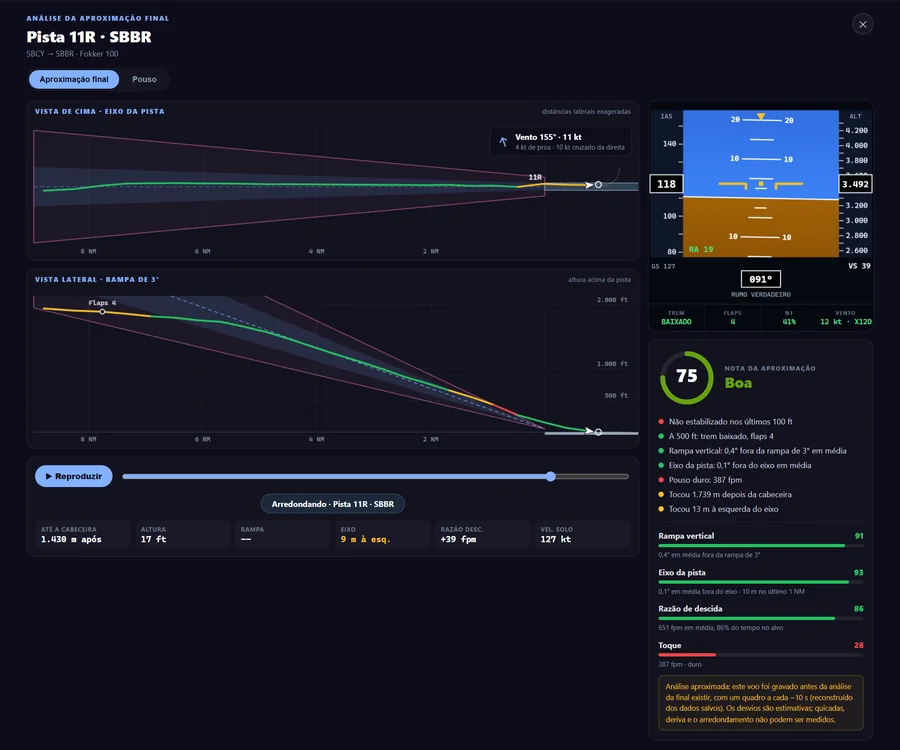
75
Good
weighted criteria score
  • Glideslope910.4° above the 3° path on average
  • Centerline930.1° off centerline on average
  • Sink rate8686% of time on target sink rate
  • Airspeedn/a10 s snapshots are not dense enough below 500 ft
  • Touchdown28387 fpm, 1,739 m past the threshold

What Volo flagged

  • Unstabilized in the last 100 ft
  • At 500 ft: gear down, flaps 4
  • Glideslope: 0.4° off 3° average
  • Centerline: 0.1° average offset
  • Firm touchdown: 387 fpm
  • Touched down 1,739 m past threshold
  • Touched down 13 m left of centerline
Volo desktop app showing the final approach analysis screen with top view, vertical profile, PFD, and score breakdown.
The same final inside the Volo desktop app, complete with simplified PFD replay.

How it works

Install, fly, and review your full report at engine shutdown.

  1. 01

    Install on Windows

    Run the lightweight installer. Volo auto-updates whenever a new release ships.

  2. 02

    Connect via SimConnect

    Sign in with your Volo account and open MSFS 2020 or 2024. Volo runs alongside the sim and puts nothing in your Community folder.

  3. 03

    Fly as usual

    Shut down at the gate and get your phase-by-phase report, final approach analysis, XP, and next route suggestions.

Every flight

Route discovery, aircraft-aware procedures, and career progression.

Global route catalog

1.1M+ real-world routes across the globe

Fly real schedules from 6,500+ airlines across 48,000+ airports worldwide — plus the 1971–1995 Fokker F27 historical network as a retro highlight.

593k+North America routes
315k+Europe routes
168k+APAC, MENA & RoW
14,800+Runways for 1 Hz final analysis
Sample regional aerodromes Retro F27 network (1971–1995) Founder recorded flights
Procedures

Checks adapted to your aircraft

Retractable gear, spoilers, and takeoff flaps are only graded when your aircraft actually has them. Lights, transponder, and parking brake are checked phase by phase.

Career & Free Mode

Contracts, schedules, and medals

Sign contracts with real airlines, generate multi-leg schedules, earn XP, ranks, and medals, or fly freely whenever you want.

SimBrief & Sharing

Two-way SimBrief + shareable flight links

Import your latest SimBrief OFP directly into the briefing or pre-fill a new dispatch in one click — and share any flight's 11-phase + final approach debrief via a revocable web link.

Leaderboard

Global ranking and medals

Track your standing among Volo pilots and collect career and Virtual Airline medals directly on your pilot profile.

For Virtual Airline managers

Still reviewing VA flights in spreadsheets?

With Volo VA, your virtual airline gets a hosted public portal, ACARS-linked leg bookings, and an operations dashboard for members, ranks, routes, medals, notices, and PIREP review.

  • Hosted VA portal with public showcase, invite links, pilot applications, and member area.
  • Leg bookings connected to Volo-Client: pilots load their booked leg straight into the briefing and PIREPs land in your review queue.
  • PIREP review with full final approach analysis, reviewer feedback notes, and full score correction history.
  • Discord webhooks for PIREP submissions, review decisions, and VA notices — plus one flat monthly price covering all active pilots and staff.
Founders Offer · 30 days free Unlimited active pilots & staff
US$ 9.99/mo US$ 14.99/mo · Brazil: R$ 49,90/mês (reg. R$ 69,90)

Hosted portal, ACARS-linked leg bookings, 1 Hz final approach PIREP review, Discord webhooks, and Stripe billing with cancel anytime.

PIREP review queue
Illustration with sample flight data.
FlightPilotFinalScoreStatus
EGLL-EHAMPilot A9194Reviewed
KJFK-KBOSPilot B6881Item adjusted
SBGR-SBRJPilot C7786Pending

Bring Volo VA to my virtual airline

Tell us a bit about your VA and we will get back to you by email.

Before you install

Install today and your next flight is already logged and analyzed.

  • Free for individual pilots.
  • Runs beside MSFS and installs nothing inside your Community folder.
  • Available in English and Portuguese (PT-BR).
  • Auto-updates whenever a new release is published.
Does it work with MSFS 2020 and 2024?

Yes. Volo connects to both Microsoft Flight Simulator 2020 and 2024 via SimConnect.

Is it free?

Yes. Individual flight tracking, career mode, and final approach analysis are free. Virtual Airlines have an optional flat monthly plan per airline.

Does it work with add-on aircraft?

Yes. Volo reads standard flight telemetry and automatically adapts procedure checks (retractable gear, spoilers, takeoff flaps) to the aircraft you are flying.

Does it impact simulator FPS?

Volo runs as a separate desktop app requesting one telemetry packet per second via SimConnect and touches nothing in your Community folder.

Is Volo available in English?

Yes. The website, Virtual Airline portals, and the Volo desktop app support English and Portuguese (PT-BR).

Can I run my Virtual Airline on Volo?

Yes. Check the Virtual Airlines section above and send us a quick message.

Ready for your next leg

On your next flight, your route, phase report, and approach are already logged.

Download Volo on the Windows PC where you fly, sign in, and fly as usual.

Download for Windows Join our Discord

Free download · version 0.5.0 · Windows 10 & 11

Not at your flight sim PC right now?

Get notified by email when a new Volo version ships. Unsubscribe anytime.